目标
- 配置 v2ray 使其接受透明代理的流量
- 配置 iptables 将所有 tcp 和 udp 53 的流量转发给 v2ray
- OpenWrt 配置 v2ray 服务
V2ray 配置
v2ray 的配置如下:
{
  "log": {
    "access": "",
    "error": "",
    "loglevel": "warning"
  },
  "policy": {
    "levels": {
      "0": {
        "uplinkOnly": 0,
        "downlinkOnly": 0,
        "connIdle": 150,
        "handshake": 4
      }
    }
  },
  "inbounds": [
    {
      "port": 1088,
      "listen": "0.0.0.0",
      "protocol": "http",
      "settings": {
        "userLevel": 0,
        "auth": "noauth",
        "udp": true,
        "ip": "127.0.0.1"
      },
      "streamSettings": {
        "sockopt": {
          "mark": 255
        }
      }
    },
    {
      "port": "1099",
      "listen": "0.0.0.0",
      "protocol": "dokodemo-door",
      "settings": {
        "userLevel": 0,
        "network": "tcp,udp",
        "timeout": 30,
        "followRedirect": true
      },
      "sniffing": {
        "enabled": true,
        "destOverride": ["http", "tls"]
      }
    }
  ],
  "outbounds": [
    {
      "mux": {
        "enabled": false,
        "concurrency": 8
      },
      "protocol": "vmess",
      "tag": "default",
      "settings": {
        "vnext": [
          {
            "address": "127.0.0.1",
            "users": [
              {
                "id": "a994b3c1-c7cc-4868-8072-c93e491bba0b",
                "alterId": 64,
                "level": 0,
                "security": "aes-128-gcm"
              }
            ],
            "port": 10086
          }
        ]
      }
    },
    {
      "protocol": "freedom",
      "settings": {},
      "tag": "direct",
      "streamSettings": {
        "sockopt": {
          "mark": 255
        }
      }
    }
  ],
  "dns": {
    "servers": ["8.8.8.8", "8.8.4.4", "localhost"]
  },
  "routing": {
    "strategy": "rules",
    "domainStrategy": "IPIfNonMatch",
    "settings": {
      "rules": [
        {
          "type": "field",
          "ip": ["geoip:private"],
          "outboundTag": "direct"
        },
        {
          "type": "field",
          "ip": ["geoip:cn"],
          "outboundTag": "direct"
        },
        {
          "type": "field",
          "domain": ["geosite:cn"],
          "outboundTag": "direct"
        }
      ]
    }
  }
}
配置里有几个重点要说下,第一个是 dokudemo-door 的配置:
{
  "port": "1099",
  "listen": "0.0.0.0",
  "protocol": "dokodemo-door",
  "settings": {
    "userLevel": 0,
    "network": "tcp,udp",
    "timeout": 30,
    "followRedirect": true
  },
  "sniffing": {
    "enabled": true,
    "destOverride": ["http", "tls"]
  }
}不要忘了添加sniffing的配置,这个配置是为了从流量中提取 ip 和 domain 信息,这样针对 ip 和 domain 的路由规则才能生效。
第二个是要给所有的outbound都打上 mark 的配置:
      "streamSettings": {
        "sockopt": {
          "mark": 255
        }
      }
这样 iptables 才能区分 v2ray 流量和非 v2ray 流量,非 v2ray 流量会被转发给 v2ray,v2ray 流量就直接从路由器发出去了。这样就避免了死循环,后面 iptables 规则的时候还会提到。
接下来就可以启动 v2ray 测试了
./v2ray -config client_proxy.json通过 http 的inbound来测试下隧道
curl -Is -x 127.0.0.1:1088 https://www.google.com没问题就可以配置 iptables 了。
Iptables 配置
先说明一点,Linux 内核的包处理框架是 Netfilter,而 iptables 只是 userspace 的工具而已,但是多年来大家叫 iptables 其实多数都是指的 Netfilter,只是习惯了。
Iptables 这块的挑战比较大,我一路试错过来,总结来说有以下几点:
- 要理解 iptables 的各个表中的链的先后顺序
- 要捕捉其他设备过来的 tcp 流量
- 要捕捉本机发起的 tcp 流量
- 要捕捉其他设备过来的 udp 53 流量,也就是 DNS 流量
- 要捕捉本机发起的 DNS 流量
Netfilter 数据包流程图
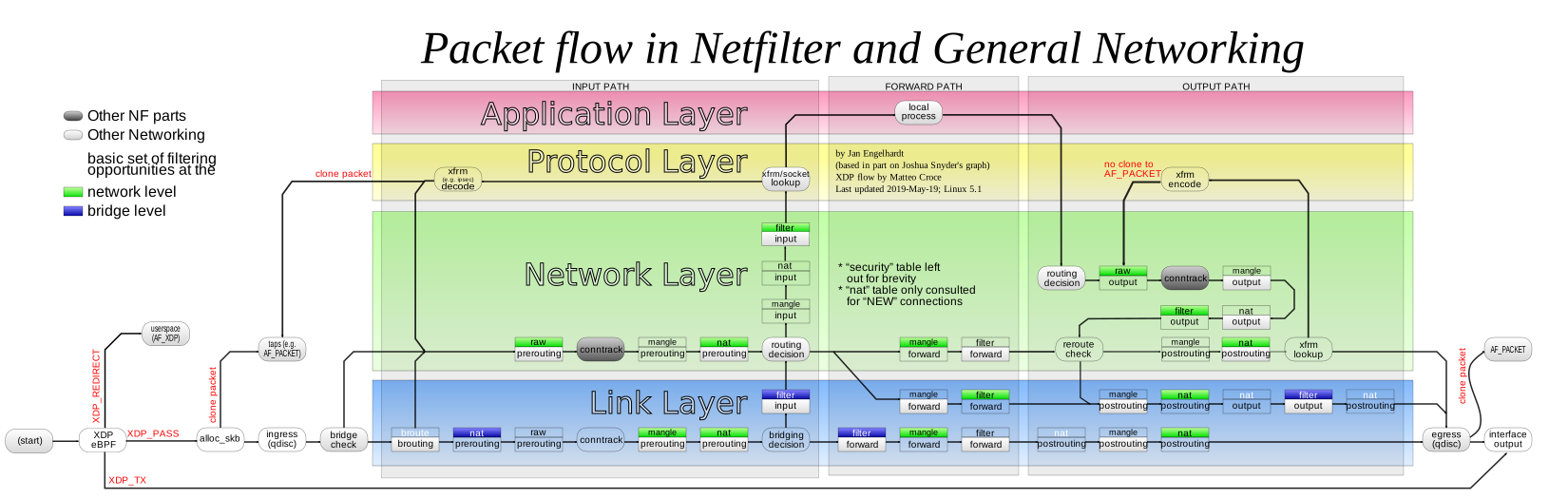
从这张图中我们可以看出对于其他设备过来的流量都应该在PREROUTING这个链来做,而对于本机发出的流量应该在OUTPUT这个链来做。但由于重定向 tcp 和 udp 流量在实现上有区别,分别用到了 iptables 里的REDIRECT和TPROXY两种技术。参考这篇博客所说,是因为 ss-redir 应用没有实现 UDP REDIRECT 相关的代码,当然我也把 UDP 全都通过REDIRECT转发给了 v2ray 结果也不行,所以 UDP 转发的部分还是通过TPROXY来实现的。
REDIRECT vs TPROXY
REDIRECT其实是 DNAT 的一种特殊形式,特殊在其把数据包的目标 IP 改成了 127.0.0.1,端口改成了--to-ports 参数指定的本地端口,这样本机的透明代理程序就能处理这个包,应用能通过内核的状态信息拿到被改写之前的目标 IP 和端口号,具体参考这里
TPROXY比REDIRECT新的特性,它能做到不修改数据包,应用只需一点改动就能实现REDIRECT所有的功能,内核文档里有如下说明:
Transparent proxying often involves "intercepting" traffic on a router. This is
usually done with the iptables REDIRECT target; however, there are serious
limitations of that method. One of the major issues is that it actually
modifies the packets to change the destination address -- which might not be
acceptable in certain situations. (Think of proxying UDP for example: you won't
be able to find out the original destination address. Even in case of TCP
getting the original destination address is racy.)
从这段说明里似乎 UDP 并没有内核状态来记录更改前的 IP 地址,这与这篇博客所说所说的有些矛盾,我目前的理解还是 UDP 在内核没有状态记录。TPROXY得以实现归结为三个要点:
- 将流量重定向到本地路由
- 路由规则定义去向
- 代理程序监听,通过特殊的参数可以响应非本机的 IP(因为包的目的地址没改嘛)
重定向 TCP 流量
新建一个 nat 链,排除私网地址流量
iptables -t nat -N V2RAY
# Ignore your V2Ray outbound traffic
# It's very IMPORTANT, just be careful.
iptables -t nat -A V2RAY -p tcp -j RETURN -m mark --mark 0xff
# Ignore LANs and any other addresses you'd like to bypass the proxy
# See Wikipedia and RFC5735 for full list of reserved networks.
iptables -t nat -A V2RAY -d 0.0.0.0/8 -j RETURN
iptables -t nat -A V2RAY -d 10.0.0.0/8 -j RETURN
iptables -t nat -A V2RAY -d 127.0.0.0/8 -j RETURN
iptables -t nat -A V2RAY -d 169.254.0.0/16 -j RETURN
iptables -t nat -A V2RAY -d 172.16.0.0/12 -j RETURN
iptables -t nat -A V2RAY -d 192.168.0.0/16 -j RETURN
iptables -t nat -A V2RAY -d 224.0.0.0/4 -j RETURN
iptables -t nat -A V2RAY -d 240.0.0.0/4 -j RETURN
# Anything else should be redirected to Dokodemo-door's local port
iptables -t nat -A V2RAY -p tcp -j REDIRECT --to-ports 1099注意这里有一个关键规则iptables -t nat -A V2RAY -p tcp -j RETURN -m mark --mark 0xff,这个规则就是为了排除 v2ray 要发出去的流量,没有这个规则的话就成死循环了,v2ray 要发出去的流量又被重定向给了 v2ray。
然后分别在PREROUTING和OUTPUT连个链里应用我们新建的V2RAY链,前者是为了重定向其他设备过来的 TCP 流量,后者是重定向本机发出的 TCP 流量。
# apply redirect for traffic forworded by this proxy
iptables -t nat -A PREROUTING  -p tcp -j V2RAY
# apply redirect for proxy itself
iptables -t nat -A OUTPUT -p tcp -j V2RAY
重定向 UDP 流量
这块要复杂一些,先新建一个 mangle 链,匹配 UDP 流量,然后应用TPROXYtarget,同时打上特定的 mark
# UDP Redirect
iptables -t mangle -N V2RAY
iptables -t mangle -A V2RAY -p udp -j RETURN -m mark --mark 0xff
iptables -t mangle -A V2RAY -p udp --dport 53 -j TPROXY --on-port 1099 --tproxy-mark 0x01/0x01注意这里也有一个关键规则iptables -t mangle -A V2RAY -p udp -j RETURN -m mark --mark 0xff目的和 TCP REDIRECT 里的一样,避免死循环。
然后配置策略路由,按 mark 匹配流量,将流量路由到本机回环接口。
# add route for udp traffic
ip route add local default dev lo table 100
ip rule add fwmark 1 lookup 100注意,这条路由规则的类型是local,我的理解内核把TPEOXY和路由关联起来了
最后就是,把这条链应用到PREROUTING链里,这样就能重定向其他设备过来的 UDP 流量了。
iptables -t mangle -A PREROUTING -j V2RAY好像还没有完,我们还没有重定向本机发出的 UDP 流量,这也是我目前的一个困惑点。先说我的做法吧,我再 mangle 表的OUTPUT链里添加了如下两条规则:
iptables -t mangle -N V2RAY_MARK
iptables -t mangle -A V2RAY_MARK -p udp -j RETURN -m mark --mark 0xff
iptables -t mangle -A V2RAY_MARK -p udp --dport 53 -j MARK --set-mark 1
iptables -t mangle -A OUTPUT -j V2RAY_MARK
第一条规则仍然是排除 v2ray 自己的流量,第二条是给 UDP 数据包打上了 mark,而只是打上 mark 怎么就出发上面的重定向规则嘞?目前我的比较粗浅的理解就是上面数据包流程图里 mangle 的OUTPUT链会触发 reroute check,也就让数据包重新从PREROUTING链走了一遍。
OpenWrt 集成
将 v2ray 作为 OpenWrt 跑到时候需要安装一些依赖包
opkg update
opkg install bash kmod-ipt-tproxy iptables-mod-tproxy bind-dig
编写 iptables 操作脚本
#!/bin/bash
# -*- coding: utf-8 -*-

start() {
    # TCP Redirect
    # Create new chain
    iptables -t nat -N V2RAY

    # Ignore your V2Ray outbound traffic
    # It's very IMPORTANT, just be careful.
    iptables -t nat -A V2RAY -p tcp -j RETURN -m mark --mark 0xff
    # Ignore LANs and any other addresses you'd like to bypass the proxy
    # See Wikipedia and RFC5735 for full list of reserved networks.
    iptables -t nat -A V2RAY -d 0.0.0.0/8 -j RETURN
    iptables -t nat -A V2RAY -d 10.0.0.0/8 -j RETURN
    iptables -t nat -A V2RAY -d 127.0.0.0/8 -j RETURN
    iptables -t nat -A V2RAY -d 169.254.0.0/16 -j RETURN
    iptables -t nat -A V2RAY -d 172.16.0.0/12 -j RETURN
    iptables -t nat -A V2RAY -d 192.168.0.0/16 -j RETURN
    iptables -t nat -A V2RAY -d 224.0.0.0/4 -j RETURN
    iptables -t nat -A V2RAY -d 240.0.0.0/4 -j RETURN
    # Anything else should be redirected to Dokodemo-door's local port
    iptables -t nat -A V2RAY -p tcp -j REDIRECT --to-ports 1099

    # apply redirect for traffic forworded by this proxy
    iptables -t nat -A PREROUTING  -p tcp -j V2RAY
    # apply redirect for proxy itself
    iptables -t nat -A OUTPUT -p tcp -j V2RAY


    # UDP Redirect
    iptables -t mangle -N V2RAY
    iptables -t mangle -A V2RAY -p udp -j RETURN -m mark --mark 0xff
    iptables -t mangle -A V2RAY -p udp --dport 53 -j TPROXY --on-port 1099 --tproxy-mark 0x01/0x01
    iptables -t mangle -N V2RAY_MARK
    iptables -t mangle -A V2RAY_MARK -p udp -j RETURN -m mark --mark 0xff
    iptables -t mangle -A V2RAY_MARK -p udp --dport 53 -j MARK --set-mark 1

    # add route for udp traffic
    ip route add local default dev lo table 100
    ip rule add fwmark 1 lookup 100

    # Apply the rules
    # apply udp tproxy for traffic forworded by this proxy
    iptables -t mangle -A PREROUTING -j V2RAY
    # apply udp tproxy for proxy itself
    iptables -t mangle -A OUTPUT -j V2RAY_MARK
}

stop() {
    iptables -t nat -D PREROUTING  -p tcp -j V2RAY
    iptables -t nat -D OUTPUT -p tcp -j V2RAY
    iptables -t nat -F V2RAY
    iptables -t nat -X V2RAY
    iptables -t mangle -D PREROUTING -j V2RAY
    iptables -t mangle -F V2RAY
    iptables -t mangle -X V2RAY
    iptables -t mangle -D OUTPUT -j V2RAY_MARK
    iptables -t mangle -F V2RAY_MARK
    iptables -t mangle -X V2RAY_MARK
    ip rule del fwmark 1 lookup 100
    ip route del local default dev lo table 100
}

case $1 in
start)
    start
    ;;
stop)
    stop
    ;;
*)
    echo "$0 start|stop"
    ;;
esac
然后是服务管理脚本
#!/bin/sh /etc/rc.common
# "new" style init script
# Look at /lib/functions/service.sh on a running system for explanations of what other SERVICE_
# options you can use, and when you might want them.

START=80
STOP=20
APP=v2ray
SERVICE_WRITE_PID=1
SERVICE_DAEMONIZE=1
PREFIX=/usr/local/v2ray

start() {
    service_start $PREFIX/v2ray -config $PREFIX/client_proxy.json
    $PREFIX/client_proxy.sh start
}

stop() {
    $PREFIX/client_proxy.sh stop
    service_stop $PREFIX/v2ray
}
最后启用脚本,开机启动
/etc/init.d/v2ray start
/etc/init.d/v2ray enable
参考文档
感谢!